
- 20 proven ways to get more Google Reviews for your business
- 1. Claim your Google Business profile
- 2. Make it easy with QR codes
- 3. Provide a review-worthy experience
- 4. Ask first-time customers for a review
- 5. Ask your loyal customers
- 6. Ask after a positive moment (not at check-out)
- 7. Ask for a review via text
- 8. Ask for a review via email
- 9. Create a Google Review page on your website
- 10. Add a Google Review widget on your website
- 11. Respond to every Google Review
- 12. Display your best reviews
- 13. Promote Google Reviews on your social media
- 14. Use review request templates
- 15. Personalize every review request
- 16. Start with a quick survey
- 17. Send out thank-you cards
- 18. Follow up with a gentle reminder
- 19. Let customers share their honest opinions
- 20. Train your staff to ask for reviews regularly
- Why Google Reviews matter for your business
- The best way to get more Google Reviews for your business
- Claim your Google Business Profile
- Make it easy with QR codes
- Provide a review-worthy experience
- Ask first-time customers for a review
- Ask your loyal customers
- Ask after a positive moment (not at checkout)
- Ask for a review via text
- Ask for a review via email
- Create a Google review page on your website
- Add a Google Review widget on your website
- Respond to every Google Review
- Showcase existing reviews
- Promote Google Reviews on your social media
- Use review request templates
- Personalize every review request
- Start with a quick survey
- Send out thank-you cards
- Follow up with a gentle reminder
- Let customers share their honest opinions
- Train your staff to ask for reviews regularly
20 proven ways to get more Google Reviews for your business
1. Claim your Google Business profile
Getting Google Reviews, of course, should start with having a Google Business Profile. Here’s a step-by-step guide on how to claim and verify a Google Business profile for your business:
- Visit the Google Business Profile website and sign in with the Google Account you want to use to manage your business.
- Search for your business name. If your business already appears on Google, select it and click “Claim this business.” If it doesn’t, create a new Business Profile.
- Provide your business information, including your category, address, phone number, website, and business hours.
- Complete the verification process. Google will ask you to verify ownership using available methods to set up your profile.
- Finish setting up your profile by adding your logo, photos, products or services, and business description.
If your business doesn’t have a Business Profile yet, here is a step-by-step guide on how to create one:
- Visit Google Business Profile and sign in with the Google Account you want to use for your business.
- Click “Get Started,” then enter your business name and select the business category that best describes what you offer.
- Add your business details, including your address, phone number, website, and other essential contact information.
- Verify your business. Google will ask you to verify your ownership using available verification methods.
- Complete your profile by adding your business hours, logo, products or services, and a business description.
Once verified, your business profile is ready to receive Google Reviews.
2. Make it easy with QR codes
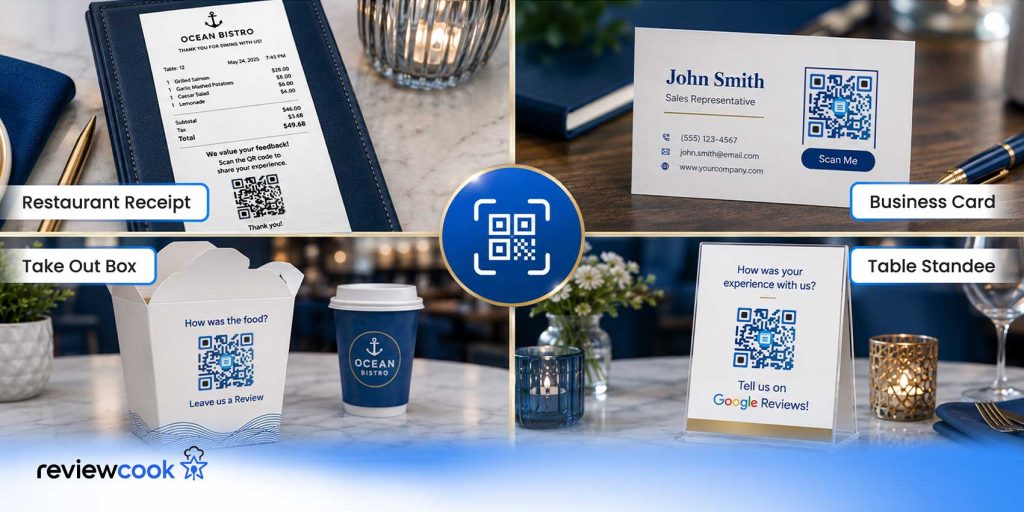
QR codes are a great way of speeding things up for customers. It saves them time from the laborious process of opening their mobile browser and entering a URL. You can print your business’s QR codes on:
- receipts
- packaging
- business cards
- in-store displays.
A dynamic Google Review QR code lets you monitor scan activity, including when your QR code was scanned, scanner demographics, and the devices used to scan the code.
Pro Tip: A dedicated review management platform can help your customers leave reviews with less effort. ReviewCook combines AI-assisted review drafts with QR codes, making it easy for satisfied customers to review, edit, and share their feedback.
Why it works: The fewer steps customers need to take, the more likely they are to complete the review.
3. Provide a review-worthy experience
Happy customers are more likely to leave positive reviews. Focus on delivering excellent products, outstanding service, and memorable customer experiences.
Research from BrightLocal indicates that 83% of consumers rely on Google Reviews when researching a business.
Providing excellent customer service and high-quality products significantly increases your chances of a high rating, attracting potential customers seeking an experience like no other.
Pro Tip: Surprise customers with small touches that exceed expectations, such as personalized thank-you notes, faster-than-expected service, or proactive assistance. Memorable experiences are more likely to inspire voluntary reviews.
Why it works: Customers naturally want to talk about experiences that exceed their expectations. The stronger the emotional impact, the more likely they are to leave positive feedback without feeling pressured.
4. Ask first-time customers for a review
Many first-time customers are willing to leave a review; they just need a reminder. A polite request can improve your review collection efforts.
Ask customers after:
- Completing a purchase
- Delivering a service
- Resolving a support request
- Receiving positive verbal feedback
You may request a review immediately after a successful purchase or positive interaction while the experience is still fresh. A timely request often results in more responses.
Pro Tip: Keep your request conversational rather than scripted. A simple “We’re glad you enjoyed your experience. If you have a minute, we’d really appreciate a Google review” feels genuine without sounding sales-oriented.
Why it works: People respond better to sincere, low-pressure requests than rehearsed sales pitches.
5. Ask your loyal customers
Your repeat customers already know and trust your business, making them the most likely to leave authentic reviews. Reach out via email, SMS, or in-store to help spread good word about your business.
If a loyal customer trusts your business enough to continue doing business with you, they are more than happy to help your business reach a wider audience.
Pro Tip: Build rapport and maintain strong relationships with your customers. Include a friendly review request during personal interactions, emails, or SMS.
Why it works: customers will trust your business, making them more willing to advocate for your brand and recommend it to others.
6. Ask after a positive moment (not at check-out)
Ask customers for a review after a positive moment, interaction, or successful transaction while the experience is still fresh. A Reddit user said:
“Ask right after a good experience, like when a customer thanks you or completes a service. You can send a short text with your Google link and a quick note like ” Your feedback helps local customers find us!”
This allows your customer to provide detailed, genuine, and positive feedback on their experience doing business with you.
Pro Tip: Train your staff to recognize positive cues, such as when a customer compliments your product, thanks your team, or expresses satisfaction.
Why it works: Customers leave reviews when they’re feeling satisfied, and their experience is still fresh.
7. Ask for a review via text
Sending a text message to your customers is a great way to politely follow up on a review request or ask for a first-time review.
Address your customers by name and mention their recent purchase or visit. Here is a sample of what to say:
“Hi, [customer’s name]! Thank you for your recent [purchase/use of service] with us! We truly value customer feedback, and we would appreciate it if you could take a few moments to leave a Google Review. Here is a direct link to our Google Business profile to ease the process: [link]”
Pro Tip: Do not offer points, rewards, discounts, or freebies in exchange for a review, as this violates Google’s Review Policy.
Why this works: Text messages have high open rates and are typically read within minutes, making them an effective channel for review requests.
8. Ask for a review via email
If you prefer email over text, you can definitely use it to reach customers for a review.
Emails give a more professional feel when communicating with customers. Here is a sample of what to say over email:
Dear [customer’s name],
Thank you for your recent [purchase/visit] with us. We hope you were satisfied with the quality of our [product/service].
We would appreciate it if you could give us a few moments to leave a Google Review.
Google Reviews help our business by letting us know our strengths and pointing out areas for improvement.
Please [click the link/scan the attached QR code] to leave us a review on Google Reviews.
Thank you so much for your patronage. Hope to do business with you again soon.
Sincerely,
[Your name]
Pro Tip: Do not use a personal email when contacting customers; use an official business email address to make the email more official.
Why this works: Email is an effective follow-up channel because customers can revisit it whenever they’re ready to leave a review. Email gives customers the flexibility to leave a review at their convenience.
9. Create a Google Review page on your website
A dedicated review page on your website makes it easy for customers to leave reviews without having to search for your business online.
You can also display a QR code on your website that directs visitors to your Google Business Profile’s review page.
Pro Tip: Keep your review page simple and distraction-free.
Why this works: A dedicated review page removes unnecessary steps from the review process, making it easier for customers to leave feedback.
10. Add a Google Review widget on your website
Displaying a Google Review widget on your website allows visitors to see real customer feedback without leaving your site.
By showcasing recent reviews, star ratings, and customer testimonials, you reinforce your business’s credibility while encouraging new customers to share their own experiences.
Pro Tip: Build rapport and maintain strong relationships with your customers. Include a friendly review request during personal interactions, emails, or SMS.
Why it works: customers will trust your business, making them more willing to advocate for your brand and recommend it to others.
Pro Tip: Place your Google Review widget on high-traffic pages such as your homepage, product page, service page, or content page.
Why it works: A Google Review widget combines social proof with convenience. Visitors can instantly see authentic customer feedback, while satisfied customers have a quick, accessible way to leave a review.
11. Respond to every Google Review
Replying to both positive and negative reviews shows existing and potential customers that you value their feedback. It also helps build trust with future customers who read your responses.
Buffer cites that 88% of consumers prefer businesses that respond to reviews. It is important, however, to use friendly, professional language when interacting with mixed customer reviews.
Pro Tip: Respond within a few days whenever possible. Thank customers for positive feedback and address concerns professionally without becoming defensive.
Why it works: Prompt responses demonstrate that your business actively listens to customers, building confidence among both reviewers and future buyers.
12. Display your best reviews
Some cafes display a feedback board with pens and paper in-store to encourage customers to leave a review with a more personal touch. If that’s not part of your business’s vibe, why not display your best Google Reviews instead?
Print your best reviews as posters and display them at a designated area, or place table standees with various reviews about your business on tables and counters.
Pro Tip: Rotate reviews you display every few weeks and feature testimonials that highlight different aspects of your business.
Why this works: Displaying real customer reviews provides immediate social proof. When visitors see that others have had positive experiences, they’ll trust your business and feel encouraged to share their own feedback.
13. Promote Google Reviews on your social media
Display your best Google reviews on your website and social media channels. Positive testimonials provide social proof and encourage more customers to share their experiences.
Allow customers to post on your social media accounts, such as Facebook or X. A common business tactic is to pin the best reviews to the top of your feed for maximum visibility.
Pro Tip: Highlight reviews that mention specific products, services, or customer experiences rather than only displaying five-star ratings with general descriptions.
Why it works: Detailed testimonials are more authentic and help potential customers understand what they can realistically expect.
14. Use review request templates
Having ready-to-use review request templates helps your team consistently ask for Google Reviews while maintaining a friendly, professional tone.
Customize each template by including the customer’s name, mentioning their recent purchase or visit, and providing a direct link or QR code to your Google Review page.
Pro Tip: Create separate templates for different situations, such as first-time customers, repeat customers, completed services, and follow-up messages.
Why this works: Review request templates save time while ensuring every customer receives a consistent, professional message.
15. Personalize every review request
Avoid sending the exact same review request to every customer. Mention their recent purchase, visit, or experience to make the message more genuine.
Instead of a generic “please leave us a review,” you could say, “We really appreciate your recent visit to the shop, Frank! If you have a minute, we’d love to hear your experience with us through a Google Review”
Pro Tip: Include the customer’s name and reference the product or service they purchased.
Why it works: Personalized requests feel thoughtful instead of automated, making customers more likely to respond.
16. Start with a quick survey
Before asking customers to leave a Google Review, give your customers a short satisfaction survey.
A simple questionnaire helps you understand their experience and identify whether they’re satisfied enough to share their feedback publicly.
Pro Tip: Keep your survey short: three to five questions is enough. Focus on overall satisfaction, customer service, and product or service quality.
Why this works: A quick survey allows your customers to share their thoughts while helping you identify areas for improvement.
17. Send out thank-you cards
A simple thank-you card is a thoughtful way to show appreciation while gently encouraging customers to leave a Google Review. A business owner on Reddit shared:
“I use thank you cards to write a message to customers and to give backing/stiffen small packages I send out. Some people leave comments about it being a nice touch or they love the stickers/designs of the cards I put in so it comes down to how moved folks are.”
Include a personalized message and a QR code on your cards, and add them to every in-store purchase, online order, appointment, or service completion.
Pro Tip: Keep the messages warm and genuine. Instead of asking for a five-star review, invite customers to share their honest experience.
Why this works: Thank-you cards leave customers with a positive, lasting impression of your business, inclining them to leave a positive review.
18. Follow up with a gentle reminder
Some customers intend to leave a review but simply forget.
A single follow-up message a few days after your initial request can encourage them to complete it.
Pro Tip: Limit yourself to one reminder. Ask them first about their recent experience before actually following up. Repeated requests will annoy customers and make them feel forced to leave a review.
Why it works: Many customers need only a small reminder to take action while their experience is still fresh.
19. Let customers share their honest opinions
Encourage customers to leave honest feedback, whether positive or negative. As business owners, negative comments should always be taken as constructive feedback and used to improve products and services.
Do not ask specifically for five stars. Customers should freely rate your business based on their actual and honest experience.
Pro Tip: Say “we’d love to hear about your experience with us” instead of asking customers to leave a positive review.
Why it works: Authentic reviews build greater trust with potential customers and comply with Google’s review guidelines.
20. Train your staff to ask for reviews regularly
Train your staff to ask for reviews regularly, not only when business is slow. Most businesses fail with this technique; they ask for good publicity only when sales are low, and the threat of closure is real.
Make asking for reviews part of the daily routine after a successful transaction, resolving an issue or dispute, or when the customer expresses satisfaction with the product or services.
Pro Tip: Create a simple review request script and train your staff to use it naturally after positive customer interactions.
Why it works: Regular review requests generate a steady flow of authentic reviews over time, making your Google Business Profile appear active and trustworthy.
Why Google Reviews matter for your business
Crystal Horton, a Platinum Google Business Profile Product Expert, states that Google Reviews hold valuable information about your business and help you stand out in search results.
Research found that 98% of consumers feel that reviews are an essential factor in deciding whether to make a purchase or avail of a service.
They offer customers insight into the quality of your products, services, and overall customer experience before they decide to visit or make a purchase.
Beyond building trust, Google Reviews also improve your business’s online visibility. A consistent stream of recent, authentic reviews signals that your business is active and engaged with customers.
The best way to get more Google Reviews for your business
Getting more Google reviews doesn’t require complicated strategies; it starts with providing excellent customer experiences and making it easy for customers to share their feedback.
By consistently applying these twenty strategies, you can build trust, strengthen your online reputation, and improve your visibility on Google Search and Google Maps.
Leave a Reply